Litres per 100 km, by vehicle class, by quarter
Trips and fuel events sit in the same database, so the metric is defined once and re-run by anyone who needs it.
Someone exports a Wialon report to CSV, reshapes it in a spreadsheet and sends it on. It works — until the follow-up question arrives, until two versions of the number disagree, or until the history it needs has aged out of the platform.
Wialon report
run by hand
CSV export
one period
Spreadsheet
reshape, VLOOKUP
The chart
emailed on
PostgreSQL
history already there
One query
in version control
The chart
refreshed by the tool
400 days
Wialon Hosting's default retention
What ages out of the platform cannot be recovered later, by any tool.
5 min · 400k rows
The budget one report run gets
Past either limit the run comes back empty rather than failing loudly.
No connector
Fivetran, Stitch, Airbyte, Hevo
None of them carry a Wialon source. A copy is built, or bought.
FleetSQL keeps a PostgreSQL database in sync with your Wialon account — trips, speedings, fuel events, sensors, vehicle properties and your own report templates. Nothing is written back to Wialon, and your dispatchers see exactly what they saw before.
Trips and fuel events sit in the same database, so the metric is defined once and re-run by anyone who needs it.
Your contracts and cost centres live in tables beside the telemetry. This is the join a reporting screen cannot do at any price.
The rule is a query on a schedule: reviewable, kept in version control, and testable against last year before you trust it.
History outlives the platform's retention window, because it was copied out before it aged.
Setup is an afternoon, not a project: nothing to install, nothing to host, and nothing added inside Wialon. Four steps, all of them in one console.
A Wialon API token you generate
Read-only, verified on entry, revocable in a click.
Properties, events, your reports
Only the sources you will actually query.
3 years, then every 15 min
Every run recorded, a failed one re-run.
A PostgreSQL connection string
Power BI, Grafana, psql — whatever you already run.
Four lines, and from there it is a PostgreSQL database like any other — no FleetSQL SDK to install, no query language to learn, no part of your stack that has to know FleetSQL exists. Access is per person, read-only, and revocable on its own.
The same four steps, screen by screen →The connection you are handed
The same four lines are what Power BI, Metabase, Grafana, Tableau, DBeaver, psql and pandas each ask for.
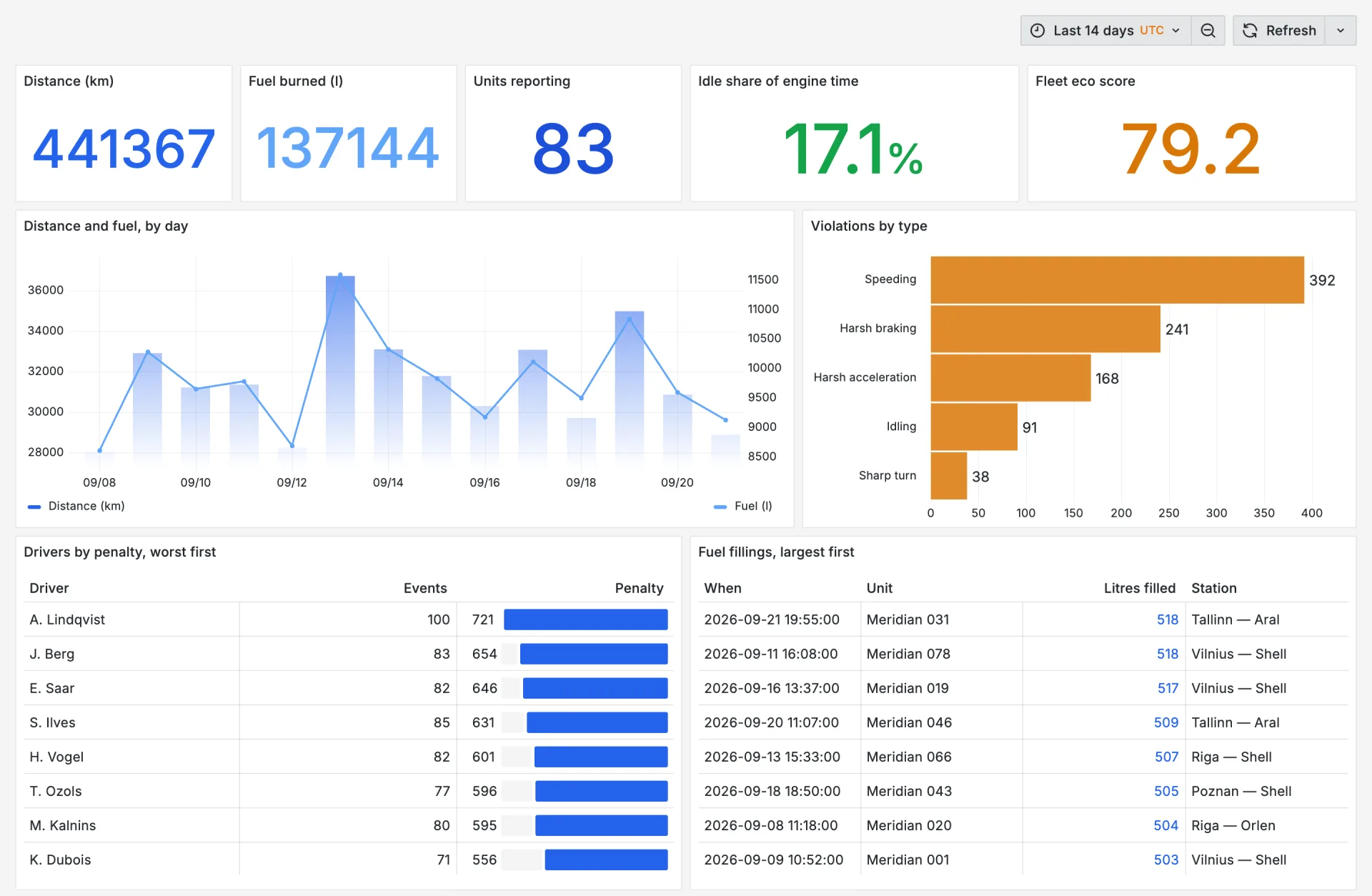
The board below is Grafana, because that is the one we can show you running. The database does not know which tool is asking: Power BI, Metabase, Tableau and Excel connect to the same host with the PostgreSQL connector they already ship, and every number is a SQL query rather than an export somebody refreshes by hand.
Get Data → PostgreSQL database
Host and database from the console. Import pulls the tables into the model; DirectQuery leaves the history in Postgres and pushes each visual down to it.
Add database → PostgreSQL
Self-service questions for the people who will not write SQL, over the same tables your analysts query.
Connect → PostgreSQL
A live connection or an extract, whichever the team already runs. Nothing about it is specific to fleet data.
Add data source → PostgreSQL
The board above, plus threshold alerting off the same queries — a drain over 20 litres becomes a notification.
The same connection string also serves psql, DBeaver, pandas, n8n and an LLM agent — what connects and how. Reporting in Power BI: Wialon to Power BI, step by step.
We set up a trial database on your Wialon account, backfilled with your own history. You look at your own numbers rather than a demo's.
What the price depends on →Both take a telematics platform you do not own and put its data in a database you do. Which one you want depends on where your devices already send their messages.
Trips, speedings, fuel and charging events, vehicle properties, sensors and your own report templates, extracted through the Wialon API into one PostgreSQL database per client. Managed: the schedule, the schema migrations and the upstream API changes are ours.
Every message flespi normalises, mirrored into self-hosted ClickHouse you run where you choose. Real-time over MQTT with a disk spool that fsyncs before it acknowledges, plus a reconciler that heals any gap by REST backfill and writes down what it could not heal.
Anything else, ask us directly — the form is at the bottom of this page.
No. Wialon stays the operational system: live positions, alerts, dispatch. FleetSQL is a queryable copy for analysis, synced on the cadence you set — as often as every 15 minutes. The routing rule is simple: happening now goes to Wialon, happened before goes to SQL.
The first run backfills up to three years, bounded by what your Wialon deployment still retains. Whatever has already aged out of the source cannot be recovered later by any tool, which is why the first extraction is worth running early.
Every client gets a separate PostgreSQL database rather than a shared table with a tenant column, so a query written for one client cannot return another's rows. Databases are EU-hosted and encrypted at rest and in transit.
A connection string. It is a standard PostgreSQL database, so Power BI, Metabase, Grafana, Tableau, DBeaver, pandas and every ORM connect with the driver they already ship — Power BI reaches it through Get Data → PostgreSQL database, in Import or DirectQuery. There is no FleetSQL SDK to install.
Yes, as a separate product. flespi backup mirrors every message flespi normalises into self-hosted ClickHouse — real-time over MQTT with a disk spool that fsyncs before it acknowledges, and a reconciler that heals gaps by REST backfill. It is described at /flespi-backup/ on this site.
Fleets whose questions are fully answered by Wialon's built-in reports. If nobody in your organisation is exporting a report to CSV on a schedule, a database is overhead bought for nothing — and we would rather say so before an invoice than after one.
Your telematics data in a PostgreSQL database you control — queryable, joinable, and yours.
Or write to us directly: [email protected]